
Alex ECU Flasher 2.3 (2026) for Windows (Activation License, no dongle)
€20.00
Windows ECU read/write tool with a brand-model-version selector. 2.3 (2026) build with an activation licence; no dongle. Instant download, EUR 20.
| File name | Alex_ECU_Flasher_(no dongle)_free_2.3(2026) (Alex ECUF Flasher with Activation license).7z |
|---|
Description
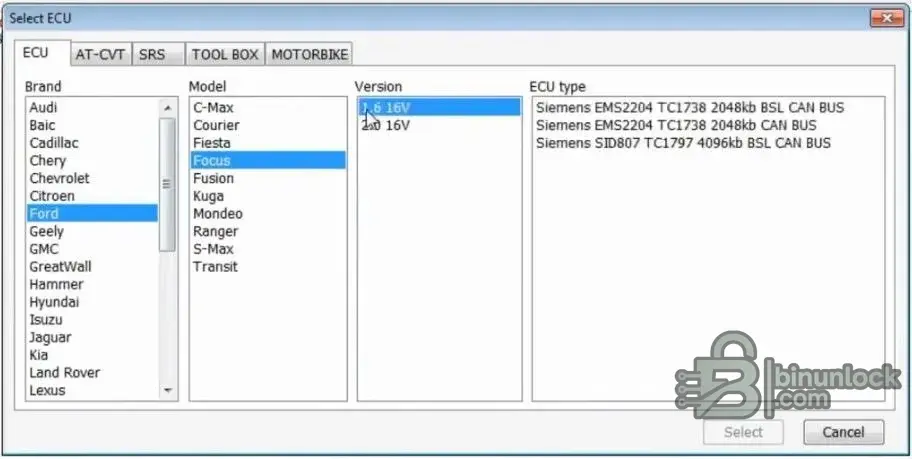
Alex ECU Flasher (ECUF Flasher) 2.3 is a Windows ECU read/write utility with a brand → model → version selector, so you can see which ECU type and protocol a vehicle uses before you connect. This listing is the 2026 build with an activation license — no dongle is required. The download is a single 7-Zip archive (~193 MB) with the program, brand packs, ECU plugin modules and the help guides.
What Alex ECU Flasher does
- ECU read and write — back up the current firmware before you change anything, then flash the calibration file you prepared.
- OBD2 diagnostics — read and clear trouble codes (DTC), with a code reference list shipped in the archive (
obdcodes_obd2.txt). - Brand → Model → Version selector — pick the vehicle and see the supported ECU type and protocol hints (CAN / BSL) before the operation starts.
- Module packs included — Honda, Nissan Full, Toyota Full, MINI Full, Delco, SRS Full and Tricore, plus SID208 reference material.
- ECU plugin modules — the
ECU###.dllfiles add communication and read/write routines for the supported ECU families (Siemens EMS2204, SID807, TC1738 / TC1797 families and others). - Guided flow — Select → Open → Perform task → Save, which keeps workshop records tidy.
Supported brands and modules
The vehicle tree covers the common European and Asian brands — Audi, BMW, Citroën, Ford, Hyundai, Jaguar, Kia, Land Rover, Renault, Toyota, VAG and more — and the archive ships dedicated packs for Honda, Nissan, Toyota, MINI, Delco, Tricore and SRS / airbag work. Airbag and Tricore functions depend on the pack that is opened, so check the included help PDFs before working on a vehicle.
What is in the archive
ECUF.exe— the main application launchergmp.dll— runtime / communication librarymessages.xml,CONFIG_DATA— interface texts and the profile databaseECU067.dll,ECU083.dll,ECU092.dll,ECU094.dll,ECU101.dll,ECU117.dll,ECU137.dll,ECU139.dll— ECU definition modules- Pack / license key file (
*.key) where the pack requires one - Help guides: ECUF Help, ECUF Help SRS, ECUF Help Tricore, SID208 documents, Windows 7 / Windows 10 installation notes
System requirements
| Operating system | Windows 10 LTSC (tested), Windows 7 / 8 / 10 / 11 — 32-bit and 64-bit |
|---|---|
| Processor | Dual-core or better |
| Memory | 2 GB RAM or more |
| Storage | 200 MB or more (a large project needs more) |
| Interface | Pass-through / J2534-class adapter, as required by the operation you run |
| Download | 7-Zip archive, ~193 MB — extracted size is larger |
How delivery works
The download link appears on the order confirmation page and in the order email as soon as the payment is complete — no account is needed. Each order allows 10 downloads within 365 days, so a reinstall or a second computer is covered. The file itself is served through the store; the folder that holds it cannot be reached directly from the internet.
Before you buy
- This is a third-party Windows tool for professional ECU service work. Read the included PDF guides first and always keep a backup of the original file.
- Some antivirus products flag activation files as a false positive. If that happens, add an exclusion or unpack the archive in a dedicated folder.
- Use the software only on vehicles and data you are authorised to service, and follow the licence terms of the software and of your diagnostic equipment.
- Sold as a digital download. Please check the compatibility list and your own setup before ordering.